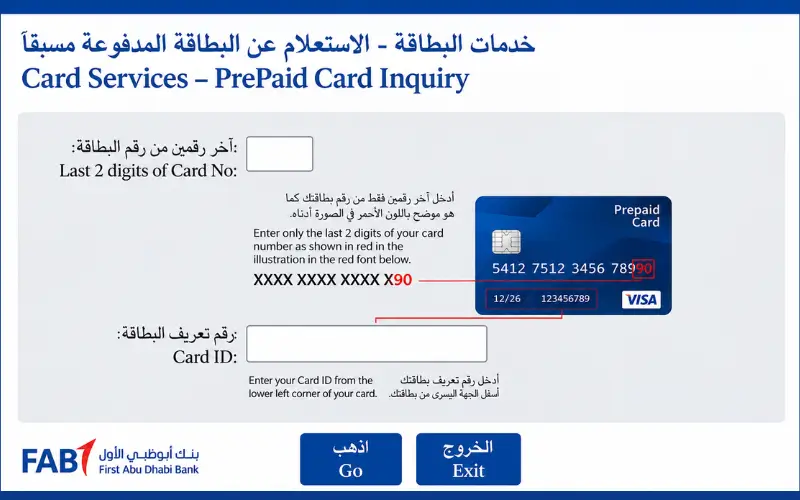
FAB balance check is the process of checking the available amount in your First Abu Dhabi Bank account or card. Available FAB banking services allow customers to check their current balance without going to a branch. The method you require will depend on your FAB bank account, your debit card, your credit card, Ratibi card, or prepaid card. The balance enquiry process differs for each option, so it is easier to choose the right one. If you’re looking for a fast and easy method to get an idea of your money, the initial step is to determine what kind of FAB account or card you’ve got.
Quick Facts
| Item | Details |
| Bank | First Abu Dhabi Bank (FAB) |
| Country | United Arab Emirates |
| Regular account balance | FAB Mobile, Internet Banking, ATM |
| Credit card balance | FAB Mobile or Internet Banking |
| Ratibi balance | Ratibi balance enquiry service |
| Payment prepaid card | Prepaid Online Portal |
| FAB customer care | 600 52 5500 inside UAE |
| International number | +971 2 681 1511 |
| Ratibi service | 600 52 2298 inside UAE |
FAB states that it has confirmed that its digital banking services include account balance and transaction history checks. Its status page, which is currently in service, also includes balance viewing as a service provided via both FAB Mobile and Internet Banking.
How to Check Your FAB Bank Account Balance
The easiest choices are FAB Mobile, FAB Internet Banking, or a FAB ATM for a standard FAB current or savings account.
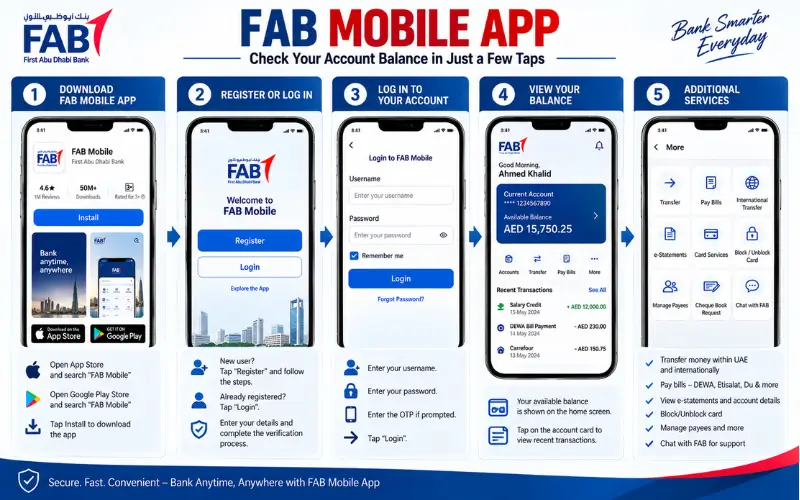
Check Your Balance Through FAB Mobile
If you are a smartphone user and mobile banking is set up, then FAB Mobile is the most convenient option.
Through its mobile application, FAB claims its customers can “manage accounts, debit and credit cards, check balances, make payments and monitor transactions”.
To view your balance:
- Open the official FAB Mobile App.
- Log in with your security credentials as registered.
- Open the relevant account/card.
- See the available account balance and account transactions.
Due to the possibility of changing the screen layout within the FAB, the names and/or positioning of the buttons might differ from previous guides.
Currently, FAB’s service-status page states that the customer is able to check their account balances and transaction history via the mobile application.
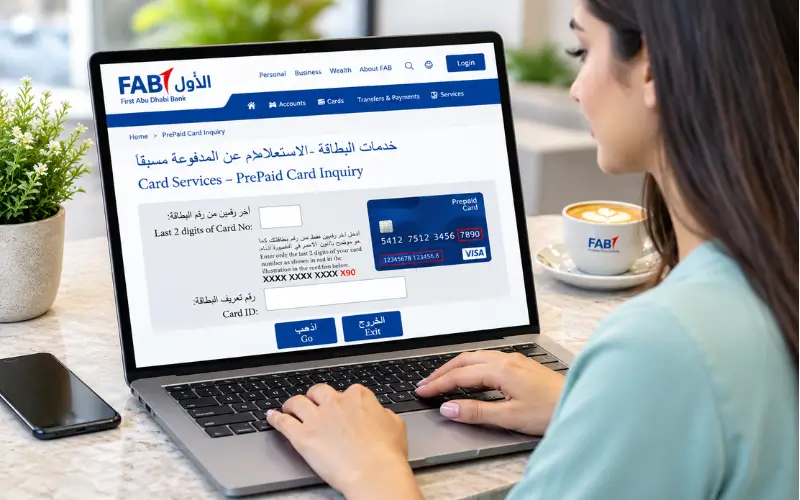
Check Your Balance Through FAB Internet Banking
FAB Internet Banking is another official mode for users who prefer using a computer or are not interested in using the mobile application.
Once signed in, click on the desired account to see its balance and transactions. FAB also offers viewing of your credit card balance and transactions as part of its Internet Banking services.
This can be helpful if you’re going over a series of transactions instead of just seeing how much cash you have.
Check Your Balance at a FAB ATM
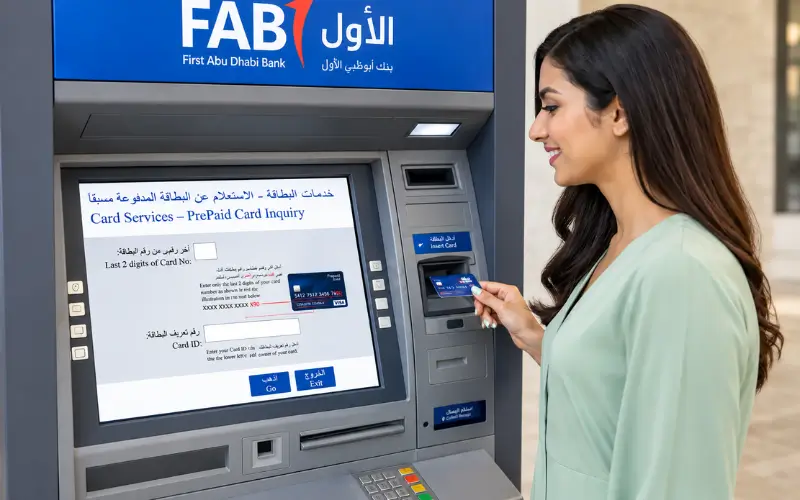
A FAB ATM could also come in handy when you require a face-to-face card-based ATM service.
Insert your eligible card, enter your PIN, and choose the appropriate balance or account-information selection displayed on the ATM screen. The options available may differ by card and ATM.
But for customers of standard bank accounts, digital banking services are typically more convenient, as it also offers access to transaction history.
How to Check a FAB Credit Card Balance
A FAB credit card balance is different from the available balance in a current or savings account.
According to FAB, Internet Banking also allows customers to access their credit card balances and transactions, and FAB Mobile offers card-management functionality.
Using FAB Mobile
Open FAB Mobile, log in, and navigate to the Cards area. Click on the credit card you need to check for information.
Other features of a service or card might include transaction and payment history and card management features.
According to FAB’s official pages, customers using FAB Mobile and Online Banking can avail a number of services like easy payment plan request and balance transfer.
Using FAB Internet Banking
Access FAB Internet Banking and select Credit Cards.
FAB currently offers the following Internet Banking services – viewing credit card balance and viewing credit card transactions.
Keep in mind that the credit card balance isn’t necessarily a representation of the amount of cash within your FAB current account. The amount on the card is related to the credit card, and the amount in your bank account is related to the funds in the bank account that the card is linked to.
How to Check Your FAB Ratibi Salary Card Balance
Unlike a traditional FAB bank account, Ratibi is not a separate account.
According to FAB, Ratibi is a salary payroll application for employees who receive salaries up to AED 5,000, which allows their salaries to be paid electronically to a prepaid card without the need for them to have a bank account.
It is important that distinction because a Ratibi cardholder may not have a traditional FAB current or savings account to go through traditional account-banking applications.
Existing cardholders of FAB can use the dedicated Ratibi Prepaid Card Balance Enquiry option on the FAB’s official website.
Ratibi Balance Enquiry
Don’t assume that a Ratibi card functions the same as a regular FAB debit card; use the balance enquiry feature of the Ratibi service.
FAB also has a customer-service telephone number just for Ratibi:
- Inside the UAE: 600 52 2298
- Outside the UAE: +971 2 499 6279
This is especially helpful if your balance isn’t showing up or if you need some help with the card.
How to Check a FAB Prepaid Card Balance
There are a number of different FAB prepaid-card products, and they’re not all designed to operate in the same manner.
The portfolio of FAB’s prepaid cards comprises government-purpose prepaid cards & Abu Dhabi Pay cards, Ratibi, Payment Prepaid Cards and DWallet.
To facilitate balance enquiry of an eligible Payment Prepaid Card, FAB offers a service to customers via the Prepaid Online Portal to enable the balance enquiry functionality.
The bank explains that the Payment Card features a free online balance enquiry and that the relevant service for this is the prepaid enquiry portal.
Payment Prepaid Card Balance
For an eligible FAB Payment Prepaid Card, the official FAB page identifies the prepaid balance-enquiry portal as:
FAB Payment Prepaid Card information
Use the FAB website, if available, instead of a third-party balance-check form.
This is crucial, as a prepaid-card portal is not supposed to show the balance of a typical FAB savings or current account.
FAB Balance Check: Which Method Should You Use?
The best way to select the right service is to identify the service by picking out the product’s official channel.
| Your product | Recommended balance method |
| FAB current account | FAB Mobile or Internet Banking |
| FAB savings account | FAB Mobile or Internet Banking |
| FAB debit card linked to account | FAB Mobile, Internet Banking or eligible ATM |
| FAB credit card | FAB Mobile or Internet Banking |
| Ratibi salary card | Ratibi balance enquiry |
| Payment Prepaid Card | Prepaid Online Portal |
| Other government prepaid card | Product-specific FAB/Magnati service |
One of the most lacking or vague aspects of most generic online guides is this separation. A page that only informs all FAB users to use the mobile app can trick prepaid card and Ratibi users.
FAB’s own product split is into account, card, and prepaid-card services, with the right balance channel for the right product.
Can You Check Your FAB Balance Without the Mobile App?
Yes, depending on the type of FAB product you hold.
Customers who have regular accounts can avail of internet banking, and those with eligible cards may use ATM. Additionally, FAB has customer-support lines dedicated to it.
There is a dedicated service for Ratibi customers, and if using a prepaid card, there is a prepaid enquiry portal for these users.
But being without the FAB Mobile app doesn’t mean you won’t have a chance to see your balance.
Can You Check Your FAB Balance by Phone?
For those who require help, FAB gives their customers phone numbers for customer support.
The bank’s general FAB customer service is available on:
- UAE: 600 52 5500
- Outside UAE: +971 2 681 1511
FAB claims that its UAE Customer Services are accessible throughout the day on its official pages.
Ratibi has a separate service number which you can use for questions relating to the salary card.
In case of a phone call to the bank, use only numbers that have been published on FAB’s official website. Never rely on phone numbers that have been acquired from social media posts or unauthorized sites.
What Is the Difference Between Available Balance and Account Balance?
The amount you see in your banking application can sometimes not be entirely the amount that you can actually spend right away.
An account balance would be the balance recorded on the account, whereas an available balance may consider the amount of transactions, holds, or other transactions that impact the available amount.
Exactly how it is presented is dependent on the FAB product and deal condition.
Whenever you have recently bought a card, a transfer has been made, been paid in, have made any kind of payments, or a transaction was reversed, give the banking system time to update the figures before you assume false figures were there.
In the event of the issue being related to the transaction, it may be useful to view the transaction history with the balance as opposed to just the balance.
Why Is My FAB Balance Not Showing?
This could be for several reasons.
The first thing is to check that the service you are requesting is the right one for your card. Different enquiry channels can be used for a rating card, a prepaid card, and a regular FAB account.
The second possibility is a temporary technical problem. FAB maintains a Service Status page that informs you of the availability of FAB’s mobile services, Internet Banking, and other services.
The third is that you haven’t received a transaction yet, or it has changed your available funds in a different way than expected.
Look at the transaction history before. If the question persists, get in touch with FAB through a formal Support network.
What to Do If FAB Mobile Is Not Working
If the FAB Mobile app is not functioning or cannot be loaded, please do not enter multiple credentials into third-party sites providing an alternative balance checker.
Rather, visit the service status page on FAB’s official website for up-to-date updates on the service. FAB has a status page for mobile-app login, viewing account balance, Internet Banking, and other services.
As an alternative, please use Internet Banking, if available, or call FAB via its official customer-service numbers.
Never give an OTP, pin and/ or banking details to anyone asking to check a balance. Do not give your OTP, pin and/ or banking details to anyone asking to check a balance for security.
FAB Balance Check Security: What You Should Never Share
There are links available that you can find in the bank-balance searches that lead to a phishing attack.
FAB places a caution on its customers never to share account information or OTPs with anyone using SMS, WhatsApp, or email claiming to be from the bank. It additionally advises against websites being set up under FAB or its group companies that are not genuine.
Use some simple precautions:
- Use the official bankfab.com website or official FAB banking application.
- Don’t give your OTP, PIN, or password to anyone else.
- Do not log your entire card details in an unknown balance-check site.
- Always check phone numbers and links on FAB’s official site.
- If there is a suspicion of fraud, contact FAB officially.
A proper balance enquiry should never go around the normal security procedures in FAB.
What If You Recently Received Your Salary?
If you receive your salary into a normal FAB bank account, then use FAB Mobile or Internet Banking to check your account.
Use the Ratibi balance-enquiry service if your employer pays your salary through Ratibi. Eligible employees (not just individuals seeking bank-to-bank funds) can receive their salary payment on Ratibi, which doesn’t require any bank account.
These differences can clarify why the individual could have some earnings paid, but not be capable of seeing the transaction under a standard FAB current account balance.
ER – If it does not show, look at the transaction information that you have available and follow up with the appropriate FAB service if the issue persists.
Is FAB Balance Checking Free?
This will depend on the product and channel.
According to the FAB Payment Prepaid Card page, enquiries about their card balance are free online with their card.
For normal banking channels, Customers are advised to check applicable FAB fees/terms for the specific Product. Not all services offered by all FAB cards cost the same.
The balance query process is also a bit exclusive compared to other processes like cash withdrawals, transfers, and replacement of the card, which could have their own terms or charges.
How to Find the Right FAB Balance Service
If you’re not sure which one you’re in, spot the product name that is on your card or documented in your FAB.
Please use one of the following options; normally, a current or savings account would direct you: FAB Mobile or Internet Banking.
A credit card should be administered from FAB’s credit handling channels.
A Ratibi card must be used by the Ratibi service.
A Payment Prepaid Card is based on the prepaid-card enquiry facility identified by FAB.
There could be other prepaid products with their own rules and channels, especially for government purposes. FAB has two pages dedicated to prepaid cards, and each individual product has its specifications, so it’s important to check this.
Conclusion
When you make use of the best option for your account or card, FAB Balance Check is simple. Regular FAB account holders may enquire about their account balance using FAB Mobile or on Internet Banking, while users of any other product, such as a debit card, credit card, Ratibi or prepaid card, may use the balance enquiry method for that product. Official FA finances are beneficial to keeping profile information secure. If the balance displayed is not consistent with your latest transactions, please check your transaction details and connect with FAB via the official support portals for any queries.
Also Read: NOL Card Balance Check: Online, NOL Pay, Tag ID & Balance Guide
Frequently Asked Questions
How can I check my FAB account balance online?
Regular FAB account balance can be viewed on FAB Mobile and FAB Internet Banking. FAB verifies that these two services allow customers to check their account balances and transaction history.
How do I check my FAB credit card balance?
Log in to FAB Mobile or Internet Banking, and go to the appropriate credit-card section. FAB offers one of the Internet banking options that includes viewing and paying credit-card transactions.
How can I check my Ratibi card balance?
FAB Ratibis are owned by their cardholders and may avail the FAB Ratibi Prepaid Card Balance Enquiry service. FAB also offers individual customer support for customers who need assistance with cards – Ratibi.
Can I check my FAB balance without logging into the app?
Yes. The Internet Banking, an authorized ATM, A prepaid-card enquiry service, or the appropriate FAB Customer-support channel will be utilized according to your product.
What is the FAB customer-care number?
Customers within the UAE can call 600 52 5500, while customers calling from overseas can call +971 2 681 1511 on FAB.
What is the Ratibi customer-care number?
FAB’s phone numbers are 600 52 229 for calls from within the UAE and +971 2 499 6279 for international calls.
Can I check my FAB balance at an ATM?
Eligible FAB cards may be used for valid account/card services at FAB ATMs. Which options are given will depend on the type of card; customers need to follow the options provided by the ATM.
Why is my FAB balance different from what I expected?
The shown amount and/or the available amount can be impacted by recent purchases, transactions, holds, and/or deposits. Check transaction history and call FAB if there are suspicious transactions or a balance that has not been explained.
Is Ratibi the same as a FAB bank account?
No. FAB refers to a salary payroll service with the prepaid card option, by which employees that meet the requirements have the means to receive their salaries without the necessity to have a bank account.
Is it safe to use a third-party FAB balance-check website?
One cannot enter sensitive banking details on an unauthorized website. FAB will issue alerts to consumers regarding fraudulent websites and tell them to be careful with the use of their account details and OTPs.
Can I check a FAB prepaid-card balance online?
Yes, if they are eligible for prepaid products. On the Payment Prepaid Card page, FAB allows you to access its prepaid portal for a free online balance-enquiry service. Other prepaid products might employ distinctive services.
What should I do if my balance is not updated?
First, review the available transaction history and FAB’s official service-status page. If the problem persists, you should reach out to FAB via its official communications channels and not fill out a website with your banking information.

1 comment
[…] Read Also: FAB Balance Check: How to Check Your FAB Account, Card or Ratibi Balance […]