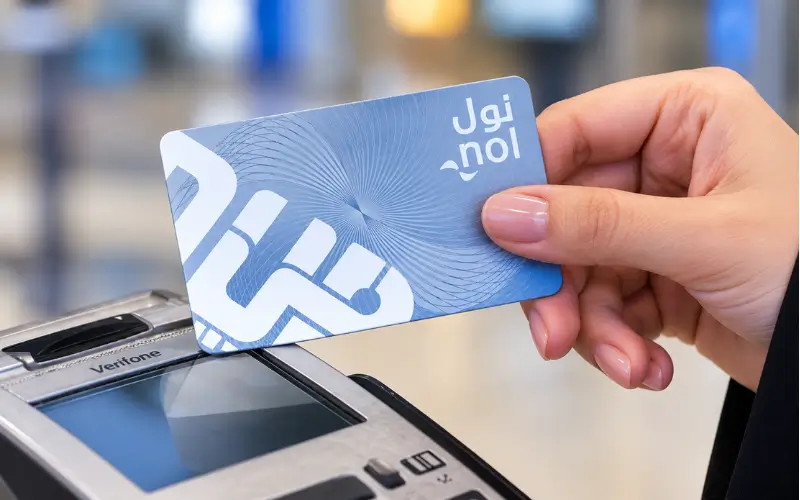
Before using Dubai public transport, check your card balance to prevent issues at the Metro gates, buses, and other modes of transport. There are various methods to view the current balance with RTA, such as through their website and the official app. The simplest answer will depend on what you have at your disposal. Your NOL Pay App Tag ID can be used on the RTA website, or you can check the card via NOL Pay. The application also offers details about the card and top-ups.
Quick Information
| Detail | Current Information |
| Official authority | Dubai RTA |
| Online check | RTA website |
| Mobile option | Nol Pay app |
| Information needed | Nol Tag ID |
| Minimum balance for Metro check-in | AED 7.50 |
| Anonymous card maximum balance | AED 1,000 |
| Registered/Personal card maximum balance | AED 5,000 |
| Minimum top-up through RTA website | AED 5 |
| Online top-up maximum | AED 150 |
| Main transport use | Metro, Bus, Tram and Marine transport |
RTA verifies that the online balance service has the NOL Tag ID. It also indicates that the minimum amount for check-in is AED 7.50.
NOL Card Balance Check Online
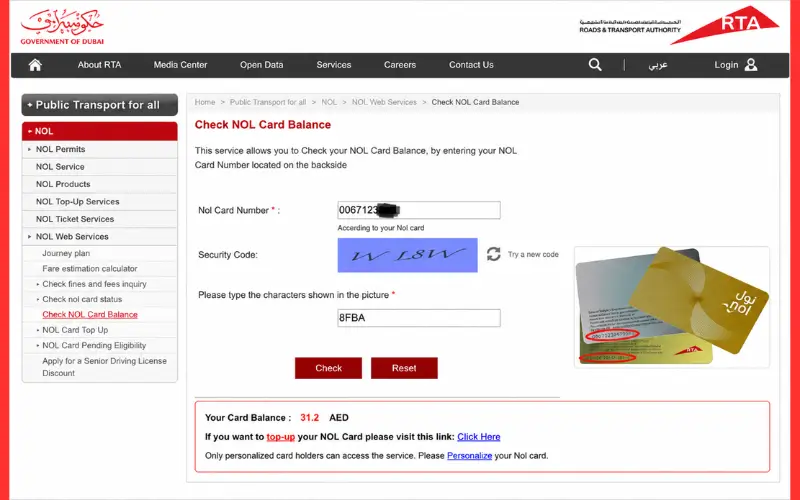
A NOL Card Balance Check can be done directly on the official RTA website. RTA’s website has a specific option for checking your balance. The NOL Tag ID is requested on the page, which also offers a search function to see the card balance.
Steps to Check Online
- Log in to the official RTA website.
- Find the Check NOL Balance service.
- Enter your NOL Tag ID.
- Select Search.
- Check the balance information that’s available.
This can be helpful when you are in a situation to check the card but don’t want to go into a Metro station.
Check Balance Through Nol Pay
Another option to view your card details is through the official Nol Pay application. RTA has confirmed that customers can confirm the balance of their Nol card via the Nol Pay app. The app can also display the card details and provide top-up features.
Depending on the phone and the card, you will be able to enter the Tag ID, or you will be able to scan a corresponding physical card by means of NFC. In the nol Pay process, both options are presented in RTA’s guide.
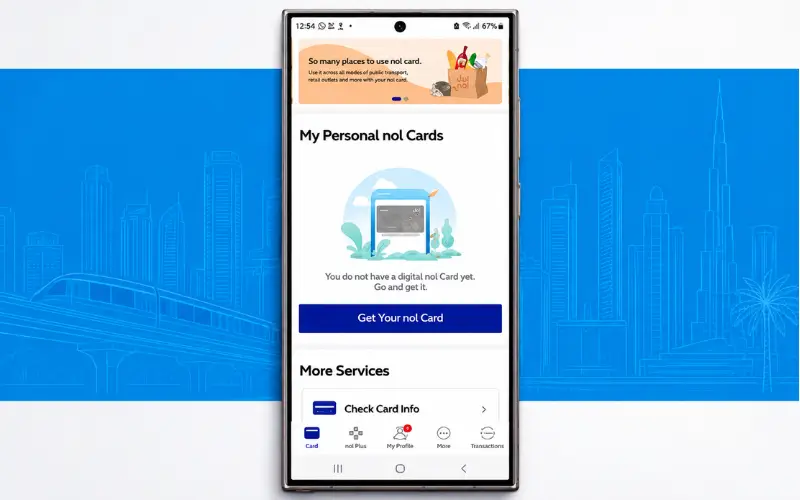
Basic Nol Pay Process
- Open nol Pay.
- Please include/add your physical Nol card.
- Type the Tag ID or use the supported card-scan option.
- Click Open Card Info. Click on Open Card Info.
- Review the balance shown.
These instructions may change in the future depending on the App version, so please refer to the instructions displayed in the official App.
What Is a NOL Tag ID?
A NOL card’s Tag ID is the number assigned by the RTA service to the card. On the back of the physical card, RTA’s NOL Pay guide will display a 10-digit Tag ID. The same guide also provides you with an option to scan the card on supported devices with NFC.
When checking the balance using the RTA website, please input the Tag ID as displayed on the card. Please note that the Tag ID is different from your PIN or other numbers that are linked to your RTA account.
Minimum Balance
It is crucial to know the minimum balance before travelling. To check in at Metro gates, RTA requires at least 7.50 on your Nol card. The same minimum requirement is in effect for the card’s normal check-in procedure.
This does NOT imply all journeys are priced at AED 7.50. It’s what you need to get going on a trip. Fares are calculated based on the zones traveled; the actual fare will vary.
Why Your Card May Not Work
If you have a low balance, you may not be able to get on the Metro. In some instances, you might have enough credit on your card to cover a night out, but when you hop on the Metro train, you will need AED 7.50 to check in.
If the card is not working, make sure that:
- Current card balance
- Card status
- Available balance since last recharge
- Determine if a top-up is required or not.
- If the card is expired or blocked.
Pending Top-Up
One of the typical problems that people face is adding funds to their accounts online, but the amount is not reflected as soon as it is added.
RTA says some of the top-ups made online and some of the mobile apps need to be activated. The customer will have to wait 45 minutes to 4 hours before inserting or tapping the card at an approved activation device.
The following activation devices are supported:
- Metro gates
- Parking meter machines
- Bus solar-powered machines
RTA explicitly mentions that the validators do not activate top-ups that need to be activated. If you’re filling up your card online, you need to know this if you use it on a bus right after you have topped up.
Minimum Top-Up Amount
The smallest amount that can be added to the channel varies by channel.
| Top-Up Channel | Minimum Amount |
| Nol Pay app | AED 5 |
| S’hail app | AED 5 |
| RTA website | AED 5 |
| Mahboub | AED 5 |
| Solar top-up machines | AED 5 |
| Some authorised sales agents | AED 5 |
| Bus TVM/TOM | AED 5 |
| RTA Dubai | AED 30 |
| Dubai Now | AED 20 |
| Metro TOM | AED 50 |
| Metro TVM | AED 20 |
The above are the amounts as provided in the revised RTA service information dated 16 July 2026.
Online Top-Up Limit
As of today, RTA has announced that the maximum limit on top-up for any single card using the internet is AED 150 for Anonymous, Registered & Personal NOL Cards. The maximum card balance varies according to card type. Anonymous cards can accept a maximum of AED 1,000; Registered and Personal cards can accept a maximum of AED 5,000.
How to Check Card Status
The card information section in the case of Nol Pay may not only include the balance.
The official app guide by RTA displays the information of the cards, including:
- Card type
- Tag ID
- Expiry date
- Card status
- Current balance
- Pending amount
Depending on the card and the version of the app, different information can be shown.
This can be useful if you’re trying to figure out why a card isn’t working.
Can You Check Balance Without Visiting a Metro Station?
Yes. The NOL Card Balance Check can be done online via the RTA website. It is not necessary to go to the ticket office just to see your balance. RTA also offers NOL Pay balance checking. It is particularly helpful if you wish to find out your balance before heading out of the house.
What If the Balance Is Wrong?
First, make sure that you have recently topped up the card. The amount may be pending instead of being available to travel if activation of the top-up is required. Some top-ups that are eligible will have to be activated within the 45 minutes to 4 hours window, claims RTA. If the issue persists, verify the card either via nol Pay or reach out to RTA via official channels.
Lost or Damaged Card
In case of loss, damage, defect, or expiration of your card, RTA offers a service for refunding your remaining balance (if any) or the prepaid balance of the card. If the cards are registered, you can apply via RTA avenues. Refunds will be issued either in cash or to another registered or Personal nol card, depending on the relevant Service Terms.
RTA says that it doesn’t charge for transferring the balance to another eligible card, but cash refunds will incur the applicable service fee.
Can You Check a Lost Card Balance?
The process is different if you have lost your card compared to checking a pending card. Registered cards: RTA will provide services to block the card and get a refund. It is important to register,r as it can help with balance protection if the card is lost or misplaced. Silver and Gold Cards are particularly recommended by RTA for balance protection.
If your card isn’t registered, there are fewer refund options, and they will be subject to the RTA’s service rules.
NOL Card Balance Check Before Travel
If you regularly travel via Dubai public transport, it is important to check your NOL Card balance before embarking on a journey. Ensure that there is sufficient credit left on your card for your intended trip. If you have deposited some cash online in the recent period, then also find whether the deposited money is pending or not.
Please keep in mind the minimum balance of AED 7.50 for Metro travel.
Common Problems
Balance Has Not Updated
A recent top-up might have yet to activate. Activate as per the instructions and give it time.
Metro Gate Does Not Open
Make sure you have a minimum balance of AED 7.50. If the card is balanced, also check the card status.
Bus Does Not Accept the New Top-Up
Some pending top-ups can’t be activated by a bus validator. Use an authorized balancing device to activate the balance.
Tag ID Is Not Accepted
Write down the tag ID as written on the tag card. The app might also work with a compatible device and be able to scan via NFC if Nol Pay is used on the device.
Best Way to Check
The easiest way to get a balance check if you already own your Tag ID is through the RTA website, which is available for quick checks. The RTA website is the easiest place to perform a quick balance check if you already have your Tag ID. However, Nol Pay is more useful when it comes to regular card management, as it can provide card information and top-up functions as well.
Conclusion:
A NOL Card Balance Check is a simple procedure that requires just a few steps via the official RTA website or Nol Pay app. RTA website offers you the ability to check the balance by entering your Tag ID, and Nol Pay offers a more comprehensive view of and control over supported Nol cards.
Ensure that there is a minimum of AED 7.50 on the card before using the Metro. If you have recently topped up online, confirm that it was not done because the amount is pending and has to be activated. Most common NOL card problems can be avoided by performing these simple checks.
Frequently Asked Questions
How can I do a NOL Card Balance Check online?
Visit the official RTA web page and click Check NOL Balance. Type in your NOL Tag ID and click Search.
Can I check my balance through nol Pay?
Yes. The NOL Pay app can be used to check NOL card balance, RTA confirms.
Where can I find my Tag ID?
The Tag ID appears on the actual nol card. RTA’s official guide states it is a number of 10 digits on the back of the card.
What is the minimum balance needed for Metro?
To check in at Metro in RTA, you need to keep a minimum balance of AED 7.50.
Why is my recent top-up not showing as available?
There are some top-ups that need to be activated. RTA says some online and mobile-app top-ups could take up to 45 minutes to 4 hours to get activated on the approved device.
Can I activate a pending top-up on a bus?
According to No. RTA, the bus validators cannot activate pending top-ups that need to be activated.
What is the maximum balance on a nol card?
The value of the NOL cards is up to AED 1,000 that can be put on the NOL cards anonymously. Registered & Personal cards are valid for up to AED 5,000.
What is the minimum online top-up?
AED 5 is the minimum amount that can be topped up via nol Pay, S’hail, the RTA website, and other channels mentioned. Other channels have different minimum amounts.
Can I get my balance back if I lose my card?
Remaining and non-activated balances up to the end of the month may be refunded through RTA’s refund service. There are special refund and transfer privileges for Registered and Personal cards.
Can I check my card expiry date?
Yes, nol Pay can present card details like the expiry date and the status of the card for supported cards.

1 comment
[…] Also Read: NOL Card Balance Check: Online, NOL Pay, Tag ID & Balance Guide […]