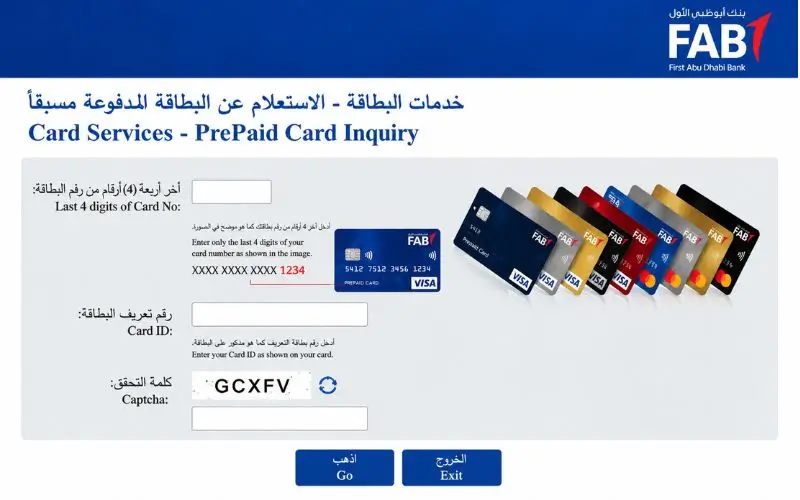
When a cardholder calls to conduct a prepaid card inquiry, they are able to see how much balance is on their card, verify salary deposits and review transactions. In the UAE, prepaid cards are widely accepted by the workforce that is paid on a payroll service like FAB Ratibi. The ability to check the balance online can help you not get your payments declined or help you manage the expenses you incur every day. Each card company has its own process, so you’ll need to use the right website or service to do this. In this article, we’re going to look at online balance checks, verification of salary, problems you may encounter, and what you need to know about security to protect yourself.
What Is a Prepaid Card Inquiry?
A prepaid card inquiry is a request to see the amount of funds that are available on a prepaid payment card. The service might also show any recent transactions, salary date, or other information about the card, depending on the service provider.
A prepaid card is different from a regular credit card in that you are using money that has been prepaid for you. Cards can be issued for employee salaries, or for specific payments or general spending. Features and fees are subject to the card agreement and the issuer.
There are several reasons to check a prepaid card, including:
- Checking if an employer has paid the salary.
- Before withdrawing cash from an ATM, check available cash.
- Checking the balance following a transaction.
- Exploring an Implicit Deduction.
- Finding out if a recent payment or transfer has been entered.
The key difference is that a balance check won’t give you access to all banking services. Some prepaid cards don’t require a bank account and do not offer a lot of functionality.
How to Check Your Prepaid Card Balance Online
The online option will rely on the card issuer. If the UAE payroll card is issued by a bank or financial institution, begin by visiting its official website, indicated on the card.
The most common steps in an online balance-check process:
- Find out who is issuing the bank or prepaid card.
- Check the provider’s official website and find the balance inquiry feature.
- Fill out the requested card information in the official portal.
- Fill out any security form shown on the page.
- Request and display the balance or transaction.
Some of the services function directly in the browser; some need an authenticated account. Not all prepaid cards will have the same portal or ask for the same identifying details.
Security reminder: Do not access a website just because it is featured in search results but requires you to enter your card information. If you can log in from the official website of the bank that issued the card, make sure you do not give your PIN or one-time password (OTP) or online banking password to a person who says they are helping you check your bank balance.
FAB Ratibi Prepaid Card Balance Check
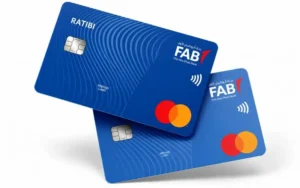
The Ratibi Prepaid Card is a First Abu Dhabi Bank (FAB) payroll solution. It enables qualified employees to get their paychecks on a card rather than having to maintain a conventional bank account. Online balance inquiry, ATM access and salary credit alerts are among FAB’s card services.
Check your Ratibi balance by following these steps:
- Access the official FAB Ratibi card page.
- Existing cardholders’ balance inquiry option.
- Go to the linked prepaid card portal.
- Type the final 4 digits of the card number into the box.
- Please enter your card ID and fill in the CAPTCHA displayed on the page.
- Make a request and check the information presented.
Currently, the FAB-linked Magnati inquiry portal displays the card digits, card ID and CAPTCHA required. The requirements might change; follow the instructions displayed on the live page.
Note: The last 4 digits and card ID are two separate fields. Never fill in your full card number in a space that asks for just four numbers.
What if the Ratibi balance page does not work?
If the portal doesn’t load or the information on the card is not accepted, verify the information that is printed on the card and submit again via the official FAB website. If it persists, reach out to FAB’s customer support, as provided on their official website.
Don’t enter personal information more than once on a site you don’t know. If the request is denied, it could be because the card ID is incorrect, the CAPTCHA was not completed, or there is a temporary service issue or a card-related issue.
Checking Salary on a Prepaid Payroll Card
Those who get paid on a payroll card should review the balance on the card as well as the transaction history. A balance will inform you of the amount of money in your account, and a transaction record will let you know if a salary credit or deduction has been processed.
The Central Bank’s Wages Protection System (WPS) in the UAE offers a regulated payment and monitoring system for wage payments via member institutions. Contracted agents are used to send wage information to the employers, who then pay the employees.
How to confirm a salary credit
- Look at the standing balance via the official communication channel of your card issuer.
- Check recent transactions for salary payment.
- Do a comparison between the amount credited and the expected net salary.
- If your card company provides you with salary notifications, review SMS alerts.
- If the expected payment is not received, call the payroll office of your employer.
Don’t think that if you don’t receive any SMS, then your salary has not been received. You may not receive an alert or may receive a delayed alert, so please look at the account or card details for the transaction.
Read Also: NOL Card Balance Check
What to do if your salary is missing
First, check with your employer when you might expect your payment. Next, check the transaction history and check with the payroll department if the payment has been made and processed.
If the employer is able to confirm that it was paid, contact the card issuer through their official support channel. Retain the date, the amount expected, confirmation from the employer and any reference to the transaction. This information may be useful for the support team to investigate the problem.
When it is not resolved, seek advice from the official labour authorities in the UAE regarding the proper complaint process. The payment system is described in the Central Bank’s WPS information, but if there is a particular dispute with an individual as regards payment, it may need to be resolved via the relevant labour authority.
Other Ways to Check a Prepaid Card Balance
While convenient online access is available, that is not the only way to get it. The methods offered vary based on card network, card issuer and card terms.
ATM balance inquiry
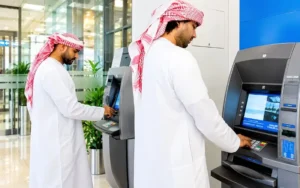
There are some prepaid cards that will allow you to check your balance at compatible ATMs. Insert the card and authenticate as directed (if prompted) and choose the balance inquiry option (if offered). Review the relevant charges before approving the request.
Mobile application
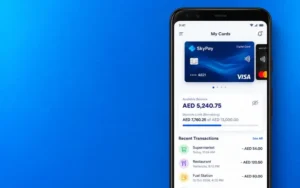
For some issuers, they offer balance and transaction histories on their official apps. Check if your specific card will work; a bank’s app may not be able to handle all prepaid products.
Customer support

If you can’t access the web, the balance you see is wrong, or the card is blocked, please reach out to the issuer. Please call the phone number on the card or the official website.
SMS notifications

If transaction alerts are possible, review your messages for any salary deposits and/or purchases. SMS can be helpful to track activity but may not be sufficient to get a balance or transaction history.
The Consumer Financial Protection Bureau states that prepaid products may have various charges for checking your account balance at the ATM, among other services. While it can help you get a good grasp of how fees are applied, the fees that are applied and consumer rules vary by country and issuer.
Read your card’s terms and conditions before deciding on a method to see if the service is free, if registration is required or if it shows the balance or other transaction information.
Common Prepaid Card Problems and Solutions
There may be several reasons for a balance check to fail. Being able to tell if a problem is a simple one or a complicated one can cause a problem to make the right next step necessary without unnecessarily blocking a card or showing personal information.
| Problem | What to do |
| Incorrect card details | Recheck the digits and Card ID requested by the issuer. |
| CAPTCHA error | Refresh the verification challenge and try again. |
| Portal not loading | Retry later or access the service through the issuer’s official website. |
| Balance appears incorrect | Review recent transactions and contact customer support. |
| Salary not credited | Ask your employer to confirm the payment status. |
| Card declined at a shop | Check the available funds, card status and applicable spending restrictions. |
| Card blocked or expired | Contact the issuer for instructions on reactivation or replacement. |
Why does the displayed balance differ from the expected amount?
The available balance may be less than the amount you think you have available due to recent transactions, pending transactions, fees or adjustments that are allowed by your card agreement. It can also take a while for a transaction to show up in the history indicated.
Always check the details of the transaction before assuming that money is lost. If you do not know what the deduction is, reach out to the issuer immediately and ask for an explanation.
What should you do if the card is lost?
Call the bank or issuer right away and request the card be cancelled, if applicable. Follow its instructions for replacement and account access.
If a transaction is not recognised, report it immediately. Maintain the necessary dates, quantities, and reference numbers; do not post your complete card number or PIN online when seeking assistance.
Security Tips for Online Balance Checks
Financial data should be taken care of, particularly when it is shared by many and/or accessed via a shared computer or public network. A proper balance service ought not to request you to give your PIN or OTP to a stranger.
When using a prepaid card inquiry service, remember these precautions:
- Check the domain before you enter the card details.
- Install the official issuer’s website/apps.
- Never share your PIN, OTP, or online banking password.
- Don’t store card information on shared devices.
- Log out of a shared computer after using it to perform a balance check.
- Make regular transaction reviews and report any suspicious transactions.
- Avoid paying an unofficial agent that claims to unlock your card or to release a salary.
Beware of sites that mimic banks or insist that you have to pay a fee to see your balance. Dubai’s official consumer rights website cautions consumers against visiting fake sites that ask for odd requests for personal data or payment.
If you are not certain of the authenticity of a portal, exit the page and go to the official website of the card issuer on your own.
Conclusion
The most basic of responsible prepaid card management tips is to keep checking on your available balance prior to any payment or cash-out. The safest way to go is to use the service given by the institution where you originally received your card, not the website or mobile app of your service provider for every product.
If you are a Ratibi cardholder, go to the official FAB website and follow the link to the balance checking service. If something seems amiss for other payroll and prepaid products, check with the issuer to begin with, review transaction history, and reach out to the official customer support of the product for issues that have not been resolved. The secure prepaid card inquiry process must provide you with the information you may need without having to provide any PIN, OTP, or banking information to another party.
Read Also: Ratibi Card Salary Check
Frequently Asked Questions
How can I check my prepaid card balance in the UAE?
Check your balance on your card issuer’s website and through its balance inquiry feature. In addition to an ATM, it’s possible to check via a mobile app or customer support, depending on the card.
Can I check my FAB Ratibi balance without a bank account?
Yes. Employees who are eligible can get salaries without a regular bank account from FAB Ratibi. Visit the official Ratibi page to access the balance inquiry service.
What details are required for an online balance check?
Some issuers require other things. The FAB connected with the Magnati portal will ask for the last four digits of the card, Card ID and CAPTCHA verification.
Can I check my salary online before withdrawing cash?
If your card can be used for online balance checking, then yes! Check your available balance and transactions before you head to an ATM.
Is an online prepaid balance check free?
The fees vary by the issuer and the method of transfer. Examine the fee schedule on your card, particularly with regard to ATM requests.
Why is my prepaid card balance showing zero?
You might not have received your paycheck yet, or your deductions might have taken a bite out of your paycheck. Review recent transactions and let your credit card company know if the problem continues.
What should I do if I forget my Card ID?
Review card documents or contact the card issuer via official support. Do not disclose PIN or OTP to an unknown person.
